Showing posts with label Microsoft. Show all posts

Tuesday, November 21, 2017

Tech Tip Tuesday: I want to Shutdown my PC, Microsoft!

Tech is back again after a rough world changing week.  Even with everything going on I must press on and bring you a Tech tip (and finish my Thor and Justice League review).

See the source imageAnyway, if you have updated your Windows 10 to Windows 10 Creative 1709, you may have notice that if you Shutdown or Restart your PC that whatever Window(s) you had open will re-open.  Microsoft claims this is innovative in helping people get back to work where they left off.  There is even a feature with Cortana where this works across devices, but something like this should be a choice and Microsoft did not give it with this latest update.

The whole purpose of shutting down and restarting is to get a fresh start.  How can I tell a use have you tried rebooting or turn it off and on again if it will just come back to the same? Well, many have complained in the Microsoft Community Page and where you can vote up to voice your concern, but Microsoft has yet to address the problem.

If you want to do a full normal shut down you open up your command prompt and use good ol shutdown /r command.

  • Just type cmd into your Cortana search bar and hit enter to open the command prompt
  • Then type shutdown /r and hit enter

  • You will see this and yep as it says your PC will shutdown and restart with a clean slate.

Tuesday, July 18, 2017

Tech Tip Tuesday: Free Microsoft Ebooks!

The best things in life are freeeee!
Want to expand your Microsoft knowledge or learn about some of the software it has to offer?  Well Eric Ligman Microsoft Director of Sales Excellence is giving away millions of FREE Microsoft  eBooks again!

Largest FREE Microsoft eBook Giveaway! I’m Giving Away MILLIONS of FREE Microsoft eBooks again, including: Windows 10, Office 365, Office 2016, Power BI, Azure, Windows 8.1, Office 2013, SharePoint 2016, SharePoint 2013, Dynamics CRM, PowerShell, Exchange Server, System Center, Cloud, SQL Server and more!


Check it out at Here!


Tuesday, June 13, 2017

Tech Tip Tuesday: Wanna Cry

Image result for wannacryI wanna cry!!!!  That may be what you say if your device is affected by the WannaCry ransomeware virus.

A nasty virus that attacks outdated Windows Devices.  What does it do?  Well its another form of the crypto virus; it will encrypt (basically change your data into unreadable files) and then charge you like 300 - 600 dollars to get them decrypted.

I'm a little late to the party as this all started back in May 2017; that is why in last week tip I talked about keeping your devices updated.


Especially in this case, you need to make sure your Windows device is updated.  Make sure Automatic updates are on.

  • For Windows 10. Go to Settings > Update & Security.  You will See your status there. 
  • For Windows 8.1 go to Settings > Change PC Settings > Update and Recovery
  • For Windows 7 go to Control Panel > Windows Update
Windows XP?  You still on that?  Why?  If you are, Microsoft went ahead and released a patch for it for the Wannacry, but keep in mind XP is no longer in service and does not receive updates regularly.  I highly recommend you update or get a new device.


I really hate ransomeware; they basically hold your data hostage.  Another thing to do is keep regular backups of your data.   Weather it be an external hard drive or using the cloud always have more than one copy of your data in a secure place.


Thursday, January 22, 2015

Microsoft is Winning: Windows 10 is Awesome!

On January 21, 2015,  Microsoft had their briefing of Windows 10 and wow did they show some amazing stuff. Now I have been on the preview copy of Windows 10 for the last few months and have been very happy with it.  What's different?  What is it like?  Well, I would describe it as if Windows 7 and Windows 8 came together and had baby.  That's right, Windows 10 takes the best of both and gives the users finally what they have been asking for!  So weather you are coming from Windows 7 or 8 the transition will be smooth and easy!

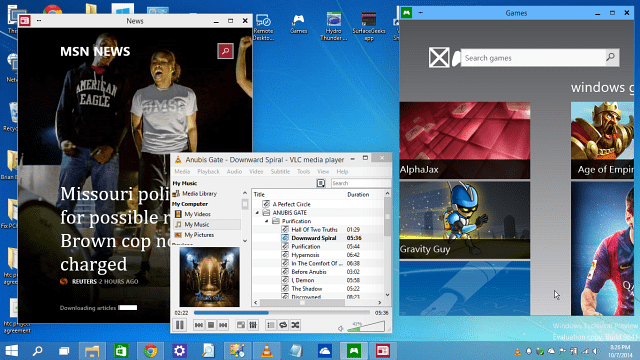
The Start Menu is back!  Yes, many did no like the full screen tiles that represented the start menu and longed for the old one; leaving third parties to make one like windows classic shell.  Windows 10 still has the live tiles but now you can view your programs like in the old start menu or you can expand it to full screen like it was in Windows 8; a handy feature when going from desktop to tablets!


What else you ask?  Another great fix that bothered the adopters of windows 8 is that your Apps Now Float on the desktop!  What does that mean?  In windows 8 the desktop itself was like an app so when you opened another app it took up the full screen.  Now, with Windows 10 the Apps appear on your task bar within the desktop environment that everyone knows and loves.  And on top of that the apps will have an icon for more options.  Thank you Microsoft for combining the desktop with the Modern UI!


They even made snapping Windows easier with Snap Assist.  Not only can you snap to the left and right but you can snap to the top right and bottom right and do the same on the left side.  Also when you drag something to snap on one side the other side will have a window with everything you have open and you can then choose which one of your open programs to snap.



And for those of you who are fans of Halo, Master Chief's trusted AI assistant Cortana makes her way to Windows 10.  That's right just as she has on the Windows phone she will be able to assist you.  Living beside the returning start button she will be able to search the web and files on your computer!  She can also dictate emails, control music, and open apps.


This is Spartan!  That's right, Cortana is not the only thing coming from Halo as Microsoft's new browser has been code named (for now) Spartan.  Spartan will be a faster and smoother browser that will allow you to annotate web pages and sync em to OneDrive and share with others!  Oh and yes, Cortana will also be a part of Spartan helping as you browse the web as if you were Master Chief himself.  Don't worry Leonidas didn't kicked internet explorer into the hole it will still be available with windows 10


Speaking of the gaming side, Windows 10 has the new Xbox app (looks to be a more fleshed out SmartGlass) allowing you chat with your Xbox Live friends, view achievements and view, comment on, share, and like game DVR clips.  Not only that but their will be games where PC and Xbox gamers will be able to play together.  Microsoft used Fable as one of the games that will be able to do this bringing the console and PC gaming community together!  Let's hope more games are to follow!


Now another gaming feature that blew my mind is the ability to Stream from your Xbox to your PC or tablet!  Meaning from your laptop, tablet, or desktop you will have access to you Xbox gaming library and will be able to play your games!  One question that was not answered is that would this be on a local network only (meaning just in your house where all devices connect to the same network) or would you in fact be able to play from anywhere around the world.  Either way its awesome and I believe the latter will happen at some point!  Microsoft more details would be revealed later...


Windows-10_Product-FamilyIf you think Xbox integration is something. Windows 10 will be the same across all platforms.  Work on one device and pick up where you left off on another.  Apps will be the same across them all making it easy for developers (they only have to make one and it will work on the phone, pc, tablet,etc)

Sooooo, when can you get you hands on it?  Well right now you can download the Windows 10 Preview.  As of now this does not include some of the above features, but you can experience the new start button and snap features. Click here to download (As I right this the link now says Coming Soon)  I recommend doing this on a device that you don't care if something goes wrong or messes up, i.e don't use your main device.

Next week they will release an update that will include more including some of the features I listed above.  As time goes on more updates will come and the full version will be released later this year.

Now the question you may be asking is how much?  Well, I am happy to tell you that if you own Windows 7 or 8 Windows 10 will be a FREE upgrade!  Yeah, that's right free.  You will have a year to take advantage of this.  How much will it cost after and for those needing a new copy is not yet known...


Now you think that was all Microsoft had to say, but no Windows 10 was not the only thing revealed.  Two new brand new, future technologies were revealed.  Microsoft Surface Hub and Microsoft HoloLens.  It is 2015 and we are getting our self lace shoes and hover boards so why not holographic technology?


MSHoloLens_MixedWorld_LivingRoom_LongBrowser_RGBYea, that's right get your Tony Stark on with Microsoft HoloLens.  Granted, you will need to wear the glasses to see the holograms, but they don't need a PC and there are no wires!  You will be able to view high definition holograms and hear in surround sound!  Your hands and voice will be your mouse and key board as you open and slide windows around your environment.  Create, learn, access info and entertainment in new futuristic and exciting ways.


Next up is something else that is out of my price ranger but on my wish list is the Microsoft Surface Hub.  Maybe I will see it on the job since it is designed for the Workplace.  The Microsoft Hub is a 84" or 55" touch screen beast of presentation software.  A digital white board if you will where you can have instant remote conferencing and multiply people can share and edit content on the screen from their own device,


I am definitely geeking out and excited for whats to come from Microsoft.  Stay tuned for more, subscribe to this blog and follow me on Twitter.


And don't forget to Like, Follow, and Subscribe to G Nation Radio.  A lot to come in 2015 like new shows and a Pod Cast!  Stay Tuned!!

Tuesday, April 29, 2014

Emergency TECH TIP!!!!! Stop using I.E.!!!

STOP Using Internet Explorer!!!

That's right everybody, a very serious bug has been found in Microsoft's key browser.  You may have already seen this on the news and yes it is a very serious matter.  So serious that the Department of Homeland Security has advise users to stop using Internet Explorer until this bug has been patched.  This vulnerability affects IE versions 6 to the current 11.

You may ask what does this bug actually do and how does it affect me.  Well, basically this bug can give hackers the same rights that you have on your Computer.  Meaning, yes they can install malware, viruses and worst of all they can get access to your passwords and bank account numbers.  And if they can choose yes then can gain access to your facebook and twitter...

An as I reported before Windows XP support has been discontinued so it is especially vulnerable!!

What do you do?  Use Google Chrome or Firefox for now.  But wait how do I get them if i can't use internet explorer? 

Get in and get out.  Use I.E. to download Google Chrome or Firefox.  Use these official links!  The hackers use links and add ridden pages to get you!

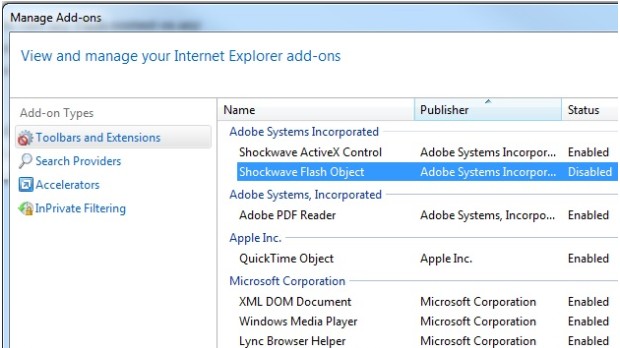
disable flash plugin
The bug isn't instant, its just a vulnerability that relies heavily on IE's extra features.  If you want to take extra precaution disable extra features or Add ons. FireEye (Who discovered the bug) recommend disabling Adobe Flash and Microsoft engineers recommend putting your browser in Enhanced Protect mode, but doing this will hinder your browsing experience so it is best just to not use I.E. until the bug is fixed.

For more on protecting yourself in I.E check out the Mashable.com article Here.

Again I stress if your in I.E. do not click on any adds, pop ups, or any suspicious links and for now don't use any sites that require your password, especially banking sites until I.E has resolved the issue.  For now Use the above mentioned browsers instead for all your browser needs until Microsoft fixes the problem.


Check out the CNNMoney Article  for more information.


@TechGNation

Thursday, April 17, 2014


All Good things must come to an End...


This is not a throwback Thursday, That's right folks, Windows XP and Office 2003 support has come to an end as of April 8, 2014.  Now you may be asking yourself, "What in the world does that mean?" Well it means there will be no more updates which means no more patching security vulnerabilities. 


Now your XP machine, the machine that has been stable and running for twelve years is no on the open market for hackers.  Now Hackers can easily get into your system.  Did you know when Microsoft puts out an update it reveals the vulnerabilities that it fixed.  Now with Windows 7 and 8 having some major updates the same day, it is easy for hackers to reverse engineer these updates and use them against the vulnerable XP.  I know, XP, has been going stronger for over 12 and half years, causing little to no consequence if a user decided not to upgrade; many home users and Companies still use the operating system.   So, now what do you do?

Simple put, it is finally time to upgrade.  Now the only way to keep using XP and be safe would be to take it off and leave it off of the internet.  So, if you want to have an offline box XP should run fine.  Now if this box hits the net and is used for everyday purposes like e-mail and web browsing; its time to upgrade. The question is, Upgrade to What?  

Windows 8
$119.99
First skip that monstrosity called Vista.  Long story short it was rushed out and had memory leaks.  Now that leaves Windows 7 and 8.  I would say Windows 7 will or has become the new XP.  By that I mean, Windows 7 is stable and is what most people and companies are on at the moment.  With the drastic changes in Windows 8, Windows 7 will be around for a long time just like XP was.  Now don't get me wrong, I for one love Windows 8 and have gotten use to it.  Now before you run off and purchase one of the upgrades you need to make sure that they will run on your PC.  I know you don't want to hear this but sometimes its just time to buy a new PC; especially if its over 10 years old.

Easiest way to see if you computer can handle Windows 7 or 8 is to use Microsoft's own readiness tools. 
Windows 7 Readiness Tool     Windows 8.1 Upgrade Assistant for Windows 7     Windows 8 Upgrade Assistant for Vista and XP

Also, Click this link for the Update to Windows 8.1:FAQ and this link for the Update to Windows 7:FAQ

Now we can't forget Microsoft Office 2003 has also lost support; since then we have had Office 2007, 2010 and the latest 2013.  I would say for now any of the later are fine if you can get your hands on them, since they are still being supported.  And as many of you know a lot of software is going to a cloud base system where you pay a yearly or monthly subscriptions for access to the software.  This allows you to always have the latest version.  Microsoft has Office 365.  Click here to see purchasing options for Microsoft Office.